



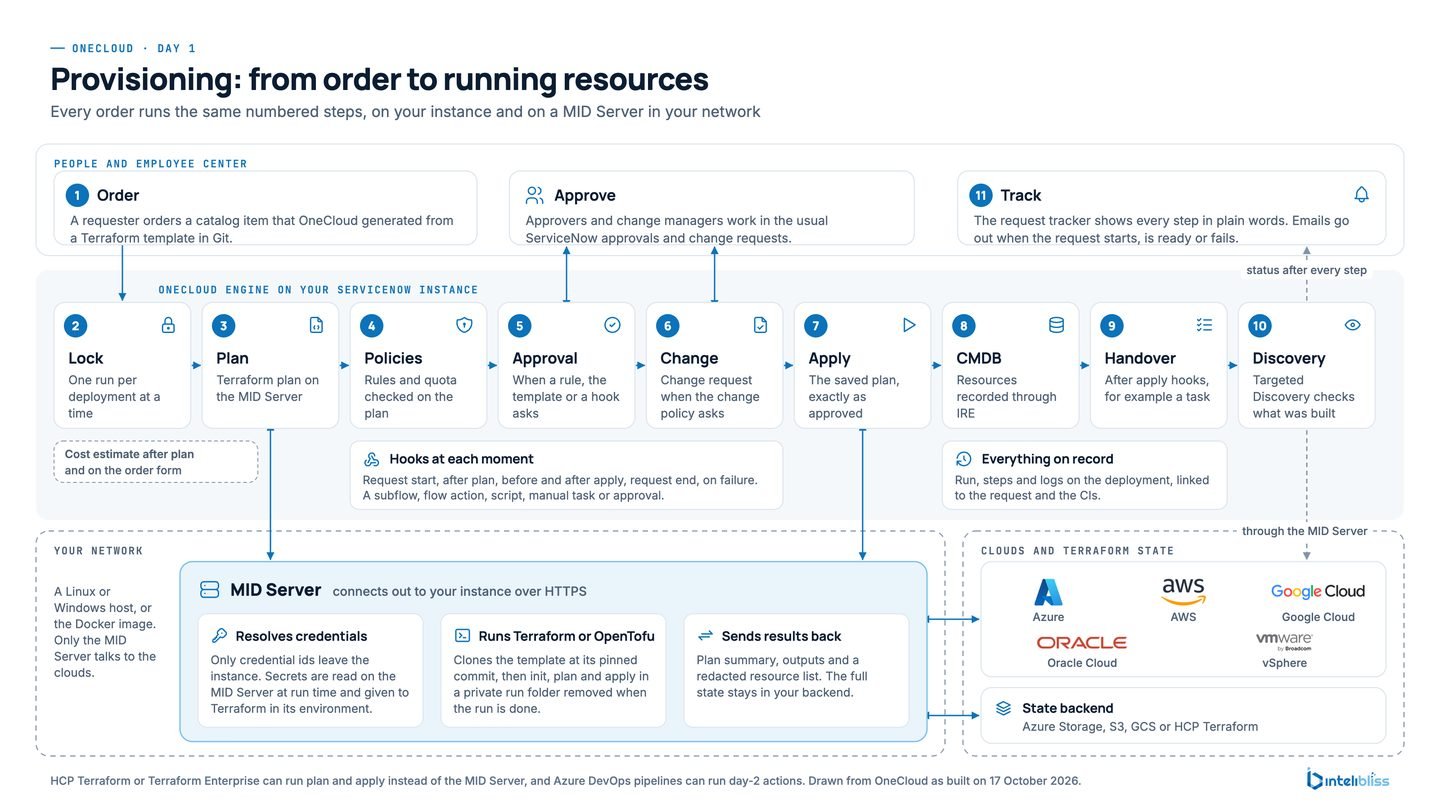
If your teams order cloud infrastructure through ServiceNow Cloud Provisioning and Governance (CPG) or Cloud Services Catalog, you’ll have seen the news. ServiceNow’s Cloud Provisioning and Governance documentation says that from the Brazil release CPG “is being prepared for future deprecation. It will be hidden and no longer installed on new instances but will continue to be supported.” The details sit in the Now Support article KB0867184.
Nothing breaks tomorrow. CPG is still supported for the customers who run it. But a product on its way out is a poor place to build the next few years of cloud self-service, and most of the teams we talk to would rather plan the move calmly than be pushed into it later.
This article is for them, and for the ServiceNow people who look after their platforms. It covers why teams are moving now, what stays exactly as it is, how the move to OneCloud works in four steps, and what you get that CPG didn’t give you.
Why teams are moving now
ServiceNow has been clear about where it’s taking the governance side of cloud: the Cloud Governance Suite, Cloud Account Management and Cloud Insights Billing. That’s a sensible direction, and we help customers adopt it. What it doesn’t include is the part most CPG customers use every day, which is people ordering infrastructure from a catalog and having it built under their own rules.
So the question isn’t whether cloud requests belong in ServiceNow. They do. It’s where the provisioning should run once CPG goes. Teams that move early get to choose the timing, test with real requests and switch one cloud at a time. Teams that wait tend to end up doing all of it in a hurry.
What stays the same in ServiceNow
This is usually the first worry, so it’s worth being plain about it. Moving to OneCloud doesn’t take anything out of ServiceNow. It keeps the work on the platform you already run and audit.
- Employee Center stays the front door. Cloud services are catalog items next to everything else people ask for, with the same look and the same My Requests.
- Approvals and Change work as they do today. Approvers use their normal approvals. Change requests are raised and moved through ServiceNow Change by the same people, under the same rules.
- Your data stays in your instance, and the CMDB stays the record. All your data stays in your own ServiceNow instance. Every resource lands in the CMDB following CMDB best practice: through the Identification and Reconciliation Engine, in the right CI class and under reconciliation rules, and Discovery confirms it where you run it.
- Your Terraform stays yours. Templates run as they are, from your own Git repositories, with whichever Terraform edition you use: Terraform Community Edition, HCP Terraform or Terraform Enterprise.
- Your custom portal, if you have one, can stay too. It can call OneCloud’s REST API with the same kind of requests it sends today.
OneCloud is a multi and hybrid cloud self-service and governance solution built on core ServiceNow platform capabilities: Employee Center and the Service Catalog, Flow Designer, the MID Server, the CMDB and Change. It doesn’t depend on CPG, Cloud Services Catalog or the Cloud API, so their retirement doesn’t touch it. It also ships its own catalog category, topics and records, and never edits yours.
How the move works
We run every migration the same way, in four steps. None of them needs a big-bang weekend.
1. Assess with a dry run
OneCloud’s importer starts with a dry run. It reads your CPG set-up and writes a report, and changes nothing. The report lists your cloud accounts and regions, templates, policies, scripts, pre and post steps and running stacks, and says which can move as they are and which need a decision. You can run it as often as you like, so it’s a good way to start the conversation with your own team before anything is agreed.
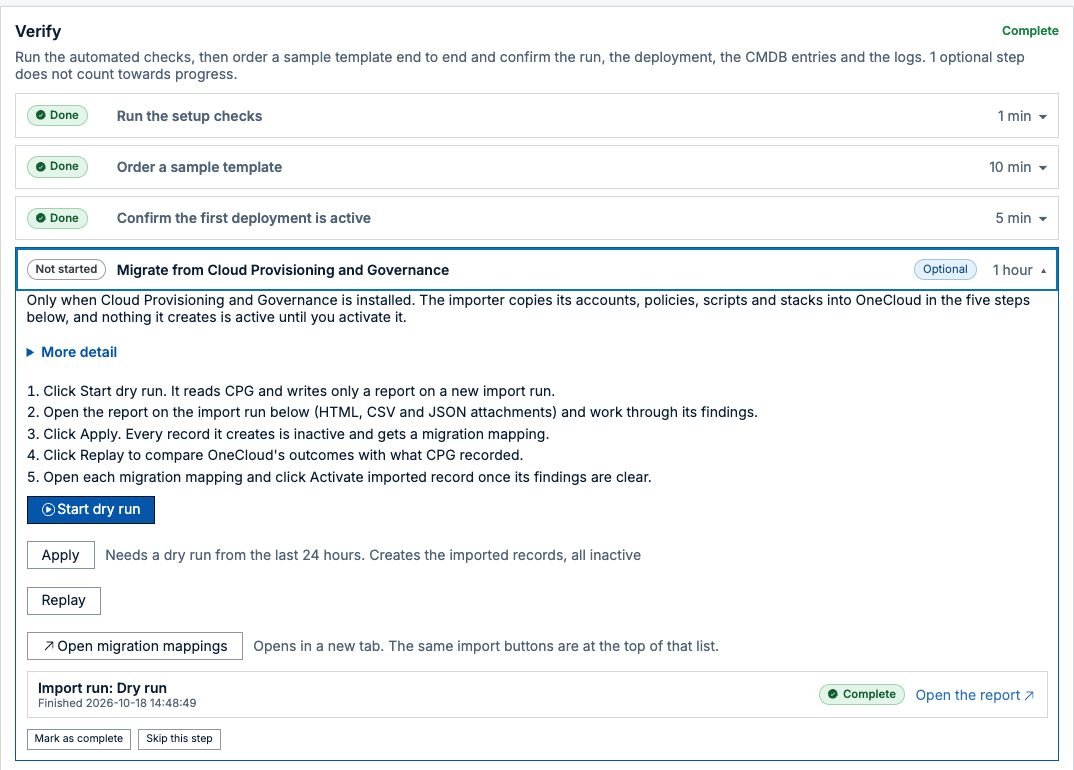
2. Import, all at once or a part at a time
When the report looks right, Apply brings the content across. You can import everything, or start with one small part, such as one cloud’s credential mappings, and grow from there. Everything the importer creates arrives switched off, with a mapping back to where it came from, so nothing changes for requesters until you decide it should.
Templates come over through Git. If they already live in a repository, OneCloud scans it. If they were kept inside CPG, the report lists their files so you can put them in a folder first. Your existing policy scripts run through an adapter that gives them the same context CPG gave them.
3. Run side by side
This is the step that makes the rest calm. CPG keeps running while OneCloud is switched on beside it. Replay runs your past CPG decisions through the imported policies and lists any difference, so you can see that OneCloud would have said yes and no in the same places. Running stacks are adopted as OneCloud deployments with their existing Terraform state, and a plan on an adopted deployment shows no changes before anyone touches it.
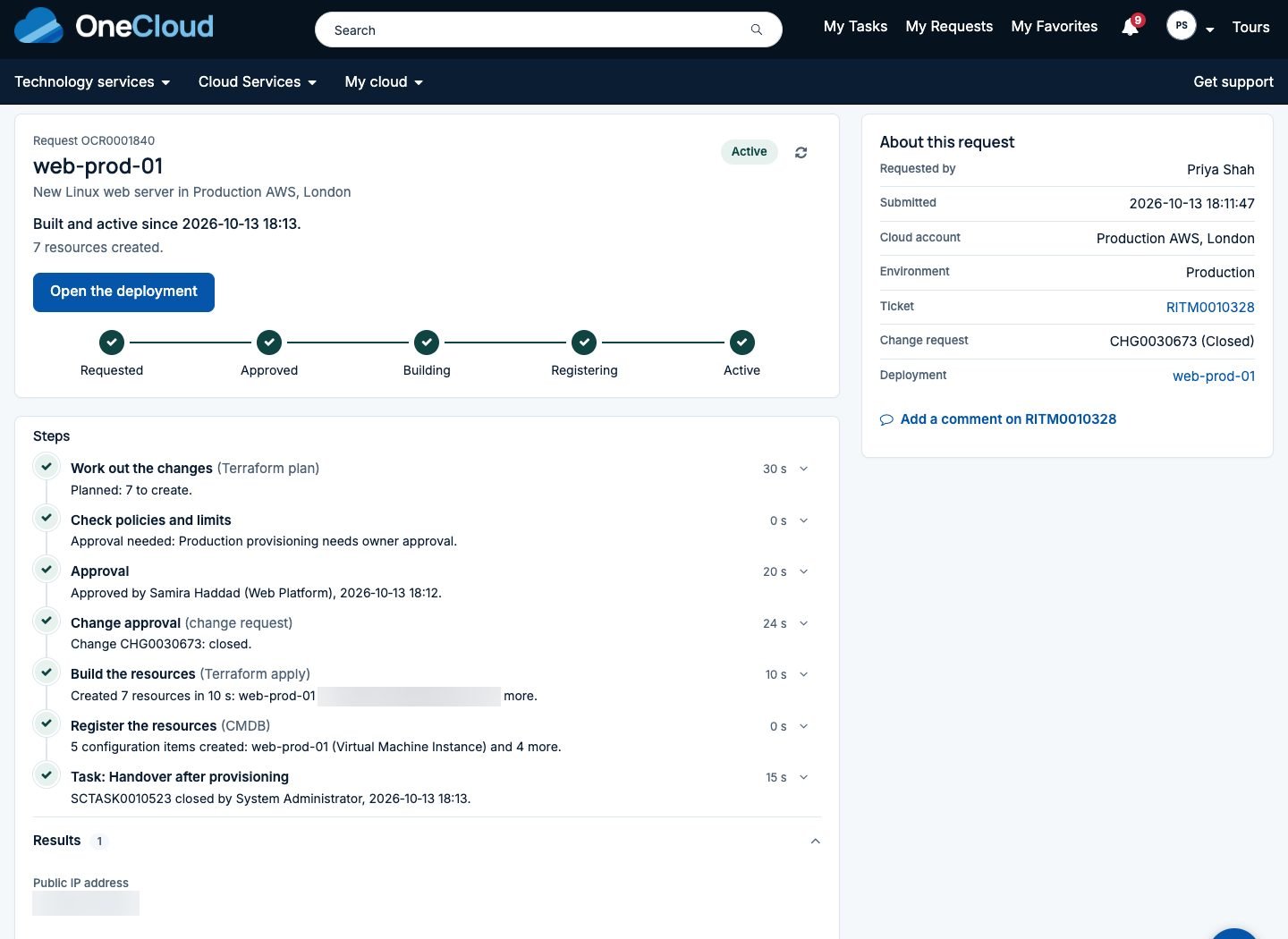
You can order a few real items, approve them, check the CMDB and remove them again, all before a single requester notices.
4. Switch over, one cloud at a time
When a cloud is ready, its catalog items move to OneCloud. Requesters see the same Employee Center and a clearer request tracker. If anything surprises you, switching back is a configuration change, not a restore. Then you do the next cloud. CPG stays installed until the last stack it owns has moved or been retired.
One piece of advice from the projects we’ve run: plan cloud discovery early. ServiceNow’s supported route away from the Cloud API is its pattern based cloud discovery, which belongs to whoever owns ITOM rather than the cloud team. OneCloud works either way, discovering what it builds where a pattern exists and recording the rest from the Terraform state.
What you get beyond CPG
Teams usually come for the migration path and stay for what’s on the other side. Here’s what changes for the people involved.
Requesters get an order form built from the template’s variables, with pick lists of their own networks and a monthly estimate before they press Order. A tracker tells them where their request is in plain words.
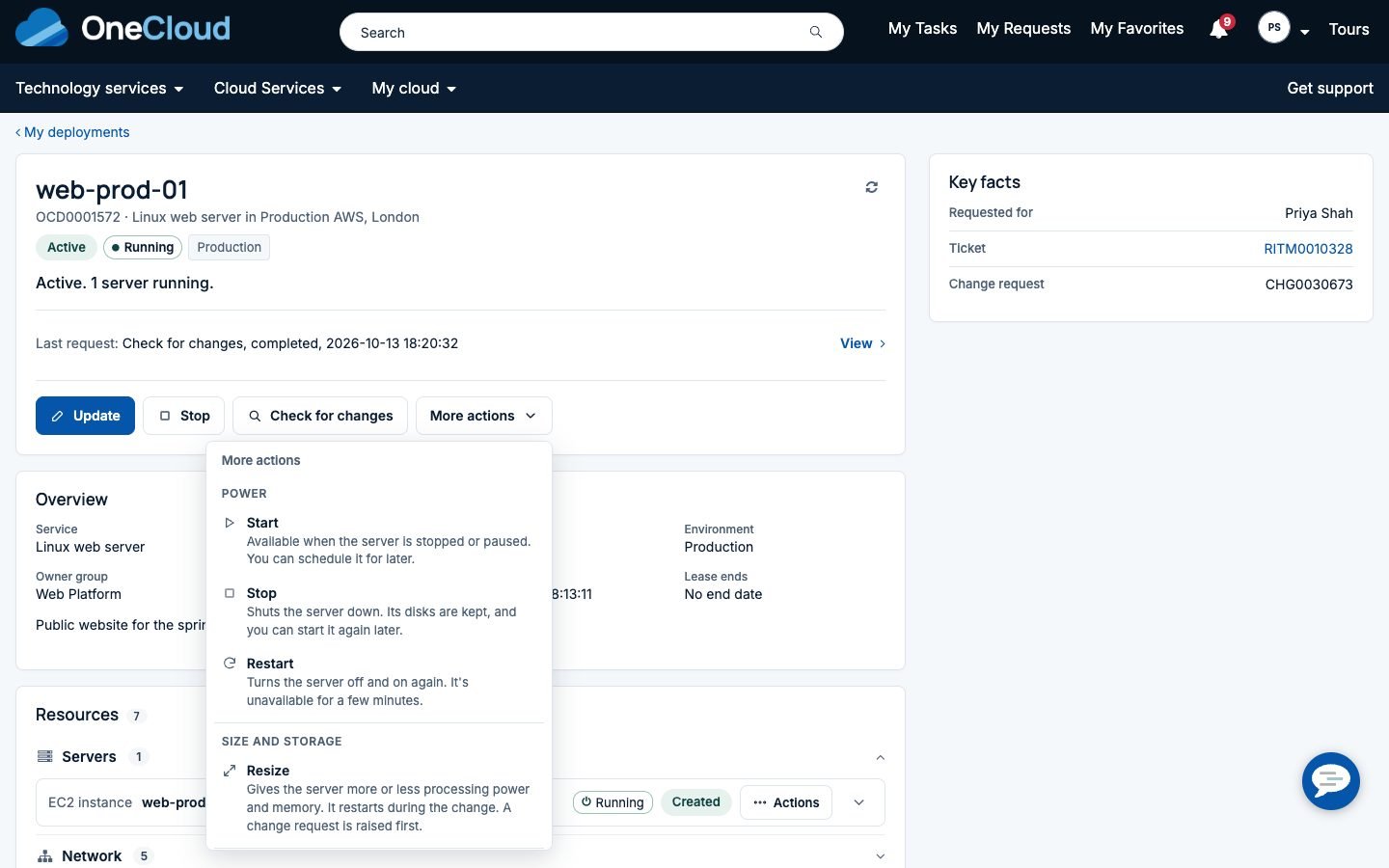
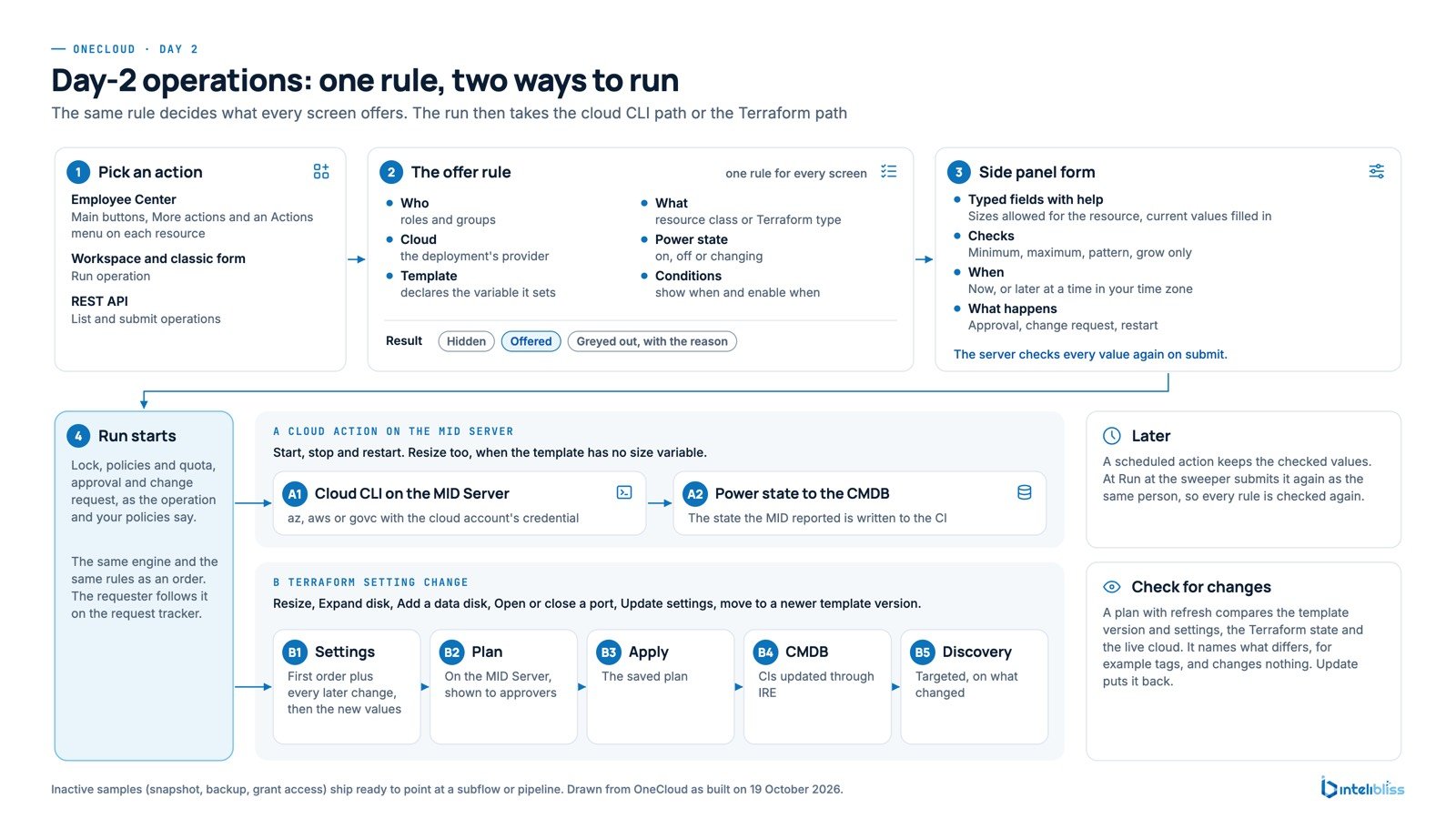
Owners get day 2 on every deployment: start, stop, restart, resize, add or expand disks, open or close ports, business hours schedules, leases and updates to a newer template version, each under the same approvals and change rules.
Platform and security teams get policy as code on every Terraform plan before approval, price limits, separation of duties, nightly drift checks and an audit trail per deployment that exports to CSV or JSON. More on that in governance without slowing people down.
Finance gets the estimate before ordering, the actual cost from the clouds afterwards and Cost and usage dashboards, in each person’s own currency. See know the cost before you order.
Everyone gets a single pane of glass for every deployment, resource, request and cost, four clouds with the same features (AWS, Azure, Google Cloud and Oracle Cloud), containers on AKS, EKS, GKE, OKE, ECS and ACI, templates from GitHub, GitLab, Azure DevOps or Bitbucket, and branded notices by email, Microsoft Teams and Slack. Managed service providers get customers, price plans and branding on one instance, described in OneCloud for MSPs.
Questions we get asked
Is CPG going away straight away? No. ServiceNow says it continues to be supported for existing customers. It’s hidden and no longer installed on new instances. That gives you time to move on your own schedule.
Is Cloud Services Catalog covered too? Yes. It’s the same product line as CPG, and OneCloud replaces both.
Do we have to rewrite our Terraform? No. Templates run as they are from your own repositories. If they were stored inside CPG, the dry run lists their files so you can put them in Git first.
What about our existing CPG stacks? They’re adopted as OneCloud deployments with their Terraform state, so you can keep changing and eventually remove them under OneCloud’s rules.
What do we need on the instance? Employee Center, a MID Server (unless Terraform runs in HCP Terraform or Terraform Enterprise) and the CMDB. We check your entitlements with you before any project starts.
How long does it take? It depends on how many clouds, templates and custom scripts you have. The dry run itself takes minutes, and we plan the rest with you from its report.
Talk to us
If CPG or Cloud Services Catalog sits under your cloud requests today, the dry run is the easiest place to start. We’ll run it with you, walk through the report and show OneCloud on your own templates. Book a short demo, see the OneCloud product page and our CPG and CSC replacement service, or write to us at info@intelibliss.com.
