



Most cloud cost conversations happen too late. Someone orders a server, it runs for a quarter, and the first time anyone talks about money is when finance asks why the bill went up. By then the approver who said yes never saw a number.
We think cost belongs on the request. The moment someone picks a size is the moment they can make a cheaper choice, and the moment someone approves is the moment they should know what they’re agreeing to. After that, the real figure should sit on the deployment itself, where the owner will actually look. That’s how cost works in OneCloud, our ServiceNow Store application for multi and hybrid cloud self-service and governance across AWS, Azure, Google Cloud and Oracle Cloud.
An estimate on the order form, with no waiting
When a requester opens a cloud catalog item, the form shows a monthly estimate and updates it as they change the size, the disk type or whether they want a public IP address. The estimate is split into its parts, so it’s clear that most of the money goes on the virtual machine and very little on the disk.
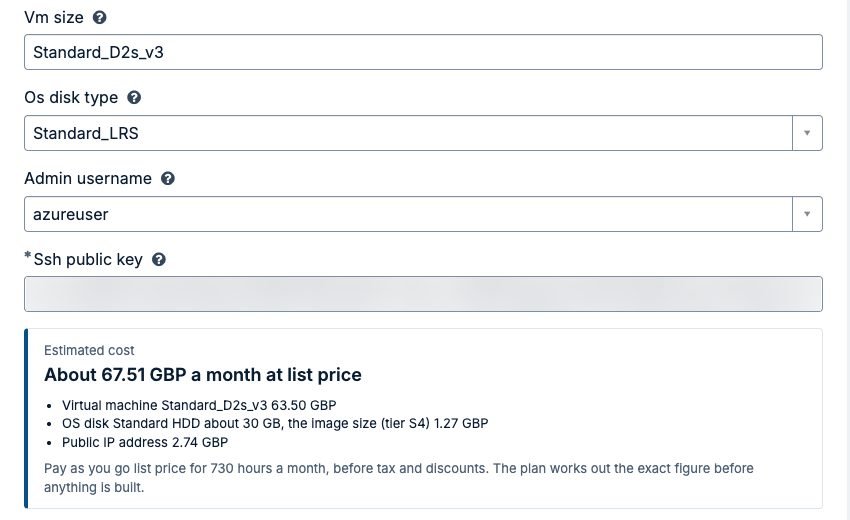
The figure is a list price estimate, and the form says so: pay as you go list price for a full month, before tax and discounts. It isn’t your bill, and we’d rather say that plainly than pretend otherwise.
What makes it practical is where the prices come from. OneCloud keeps a price book of the public list prices each cloud publishes (Azure, AWS, Google Cloud and Oracle Cloud), loaded in the background through your MID Server for the regions and services your templates actually use. The order form reads that local price book. It never calls out to a cloud pricing API while someone is filling it in, so the form stays quick and doesn’t depend on an outside service being up at that moment.
Priced again from the plan, before anyone approves
An order form only knows what the requester typed. The Terraform plan knows what will really be built. So once the request is submitted and OneCloud has run the plan, it prices the plan again, resource by resource, and that is the figure people see from then on.
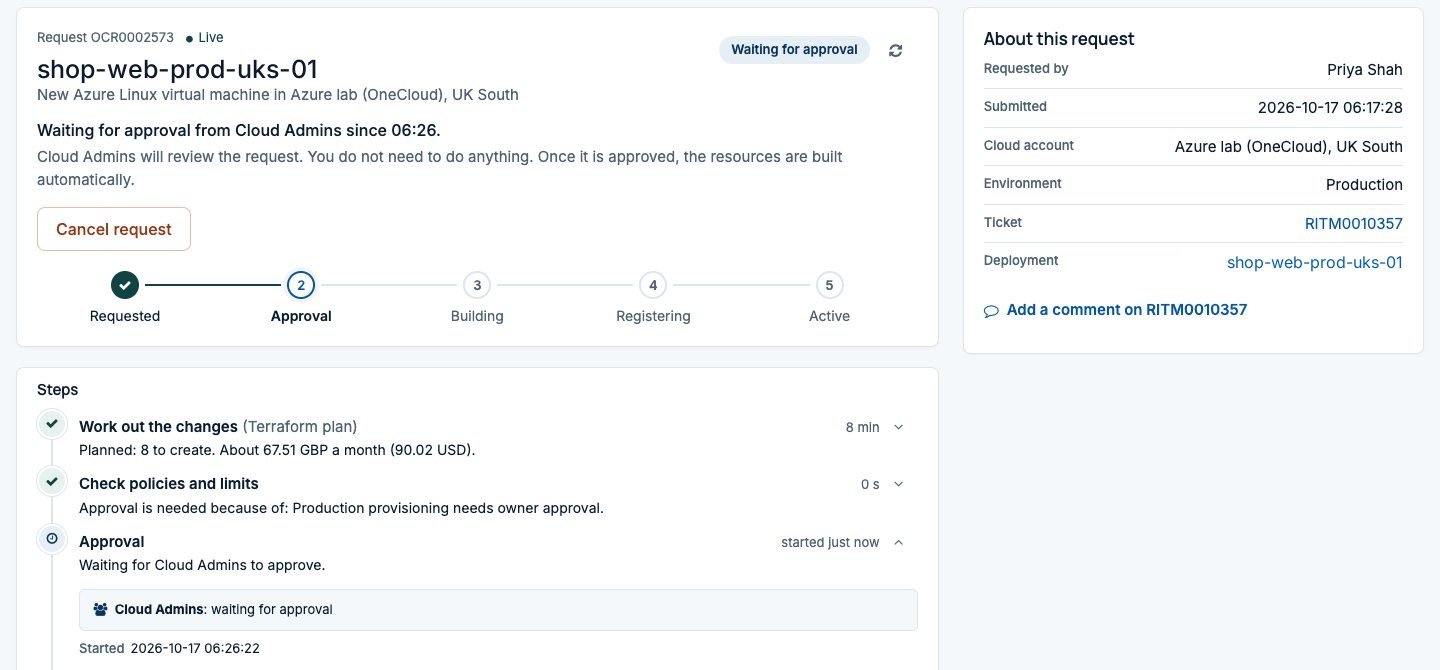
The requester sees it in the request tracker. More importantly, the approver sees it on the approval itself, with the most expensive resources listed. Approvers already know who asked and why. Now they also know roughly what it costs a month, which most of them were going to ask anyway.
You can go a step further and turn cost into a rule. A price limit is a policy like any other in OneCloud: if the estimated monthly price is above the limit you set, the order waits for an approval group before anything is built. Small development servers flow straight through, and the expensive ones get a second pair of eyes. We cover policies and approvals in more depth in governance without slowing people down.
What it actually cost, from the cloud’s own bill
Estimates help with decisions. They don’t replace the bill. Once a deployment is running, OneCloud reads its real cost from each cloud’s own cost data, using the credential the cloud account already has:
- Azure through the Cost Management API
- AWS through Cost Explorer
- Google Cloud from the Cloud Billing export in BigQuery
- Oracle Cloud through the Usage API
For large estates with many subscriptions or accounts, a cost export can be used instead of the API. Either way, the cost is matched to the right deployment by the deployment tag OneCloud puts on every resource it builds (Oracle Cloud matches by resource id). There’s no guessing and no spreading of a shared bill by formula. If the cloud didn’t return a cost, OneCloud doesn’t invent one.
Clouds publish cost a little late, often a day, sometimes more. OneCloud loads it daily and reads the last few days again each time until they settle, so the figure catches up on its own.
Cost on the deployment, in your own currency
Each deployment page in Employee Center has a Cost card: this month, last month, a 30 day trend and the most expensive resources. It stays there after a deployment is removed, so the history of what something cost doesn’t vanish with it.
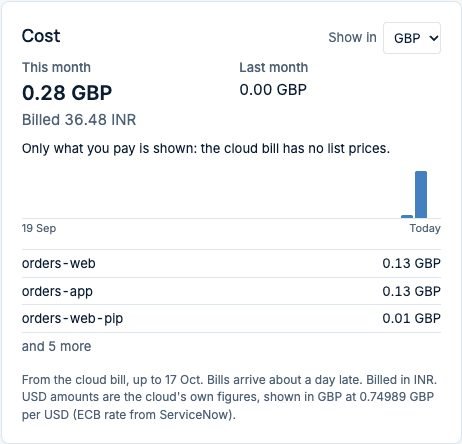
People see amounts in their own currency. Anyone can pick one from Show in on the card, and the choice is remembered. The amount the cloud actually billed, in the currency it billed in, stays visible underneath, along with the rate used. Nobody has to convert in their head, and finance can always see the original figure.
On My deployments, requesters also get My cloud spend: what they’ve spent this month so far, what that points to by month end, and their three most expensive deployments. It’s a small panel, and a good reminder of the server someone forgot to stop.
Cost and usage for the people who run it
Platform owners and finance work in the Cost and usage section of the OneCloud Workspace. It filters by date, cloud account, region, environment, owner group, template and, for service providers, customer. The tabs answer the questions we hear most:
- Overview: month to date, forecast to month end, last month over the same days, budget, and daily spend by cloud.
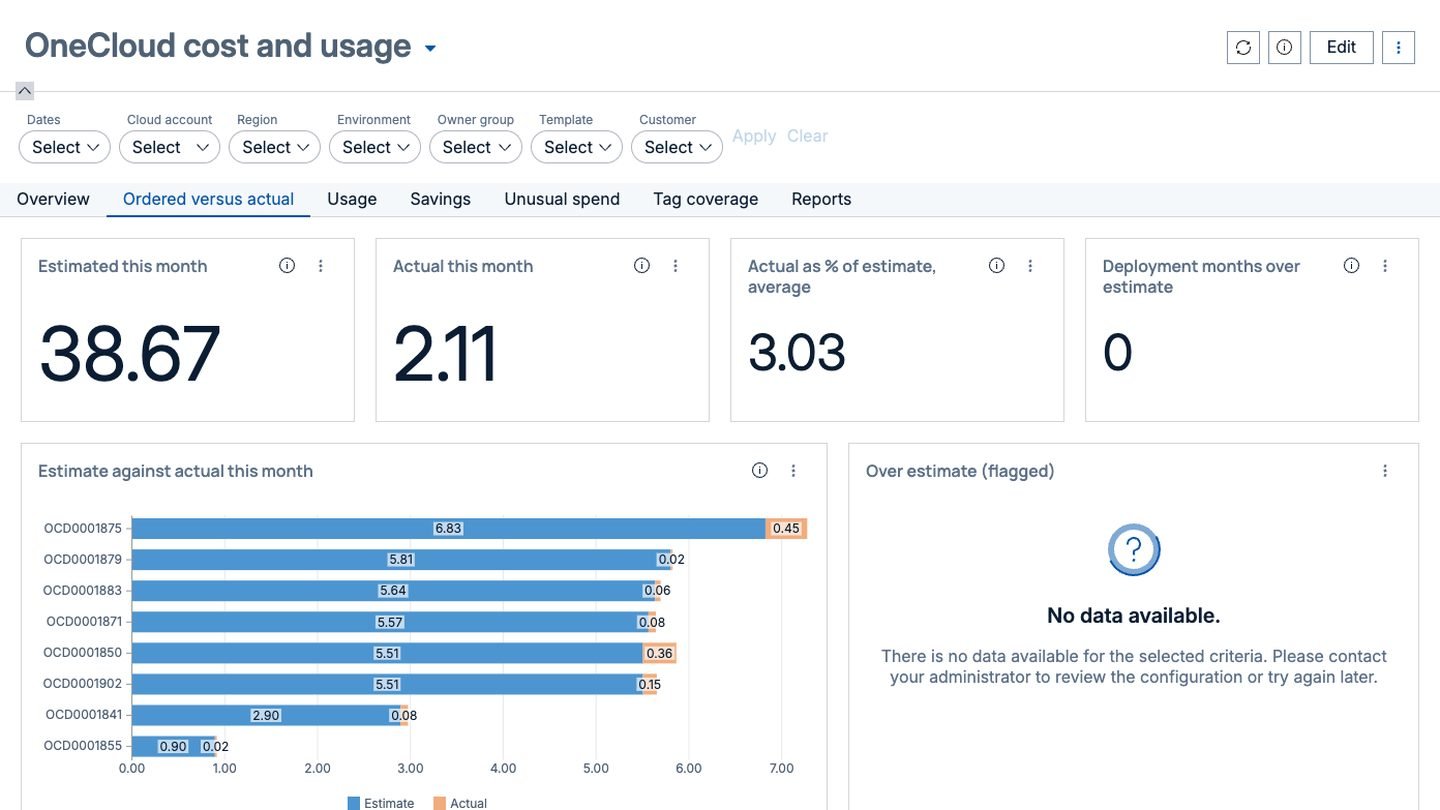
- Ordered versus actual: the estimate made at order time next to the real cost, per deployment, with the ones well over estimate flagged.
- Usage: servers running and stopped, running hours, day 2 actions, leases ending soon, and what business hours schedules saved.
- Savings: deployments past their lease, stopped servers still paying for disks, and servers running outside business hours.
- Unusual spend: days when a deployment cost far more than its recent average.
- Tag coverage: how much of each bill OneCloud can match to a deployment, and which deployments are missing required tags.
Ordered versus actual is the one we’d look at first. It tells you whether your estimates can be trusted, and it gives approvers a reason to believe the number they were shown. Every figure in these pages comes from the bill, the price book and what OneCloud knows about its own deployments, by fixed rules, so the same data always gives the same answer.
Where this fits
OneCloud isn’t trying to be your whole cloud finance practice. It puts cost where decisions are made: on the order form, on the approval, and on the deployment its owner looks after. Estimates, actual cost and display currency can each be switched on for the whole instance, one customer or one cloud account, so you can start with one team.
If you run cloud for other organisations, the same data feeds customer pricing with price plans, contracted prices and reconciliation against the cloud bill. That’s covered in OneCloud for managed service providers. And to see how OneCloud creates the catalog item that carries all of this, read catalog items, created for you.
See it on your own estate
We’re happy to show the estimate, the approval and the cost card on one of your own templates and cloud accounts. Talk to us or email info@intelibliss.com.
