



Most cloud governance is slow for the wrong reasons. Every request waits in the same queue, a reviewer reads a form that says little about what will be built, and the risky change gets the same glance as the harmless one. People learn to route around it.
We think governance should be quick for the request that follows the rules and firm with the one that doesn’t. That’s how we built OneCloud, our ServiceNow Store application for multi and hybrid cloud self-service and governance across AWS, Azure, Google Cloud and Oracle Cloud. The checks run on what Terraform is actually going to do, the approvals happen only where your rules ask for them, and everything that happens afterwards stays on the record in ServiceNow.
Check the plan, not the form
A form tells you what someone asked for. The Terraform plan tells you what will change in the cloud. OneCloud runs your rules against the plan, straight after it’s produced and before anyone is asked to approve.
The rules are written in Rego and run in Open Policy Agent on your MID Server. Each rule has one of three outcomes. It can deny the run, so it stops with the rule and the reason in the request tracker. It can warn, so the run carries on and the requester and the approvers both see the finding. Or it can deny with an override, where an administrator may let the run through with a written reason that stays on the run and shows up on the approval. If a policy can’t be checked for any reason, the run doesn’t go ahead on the assumption that it passed.
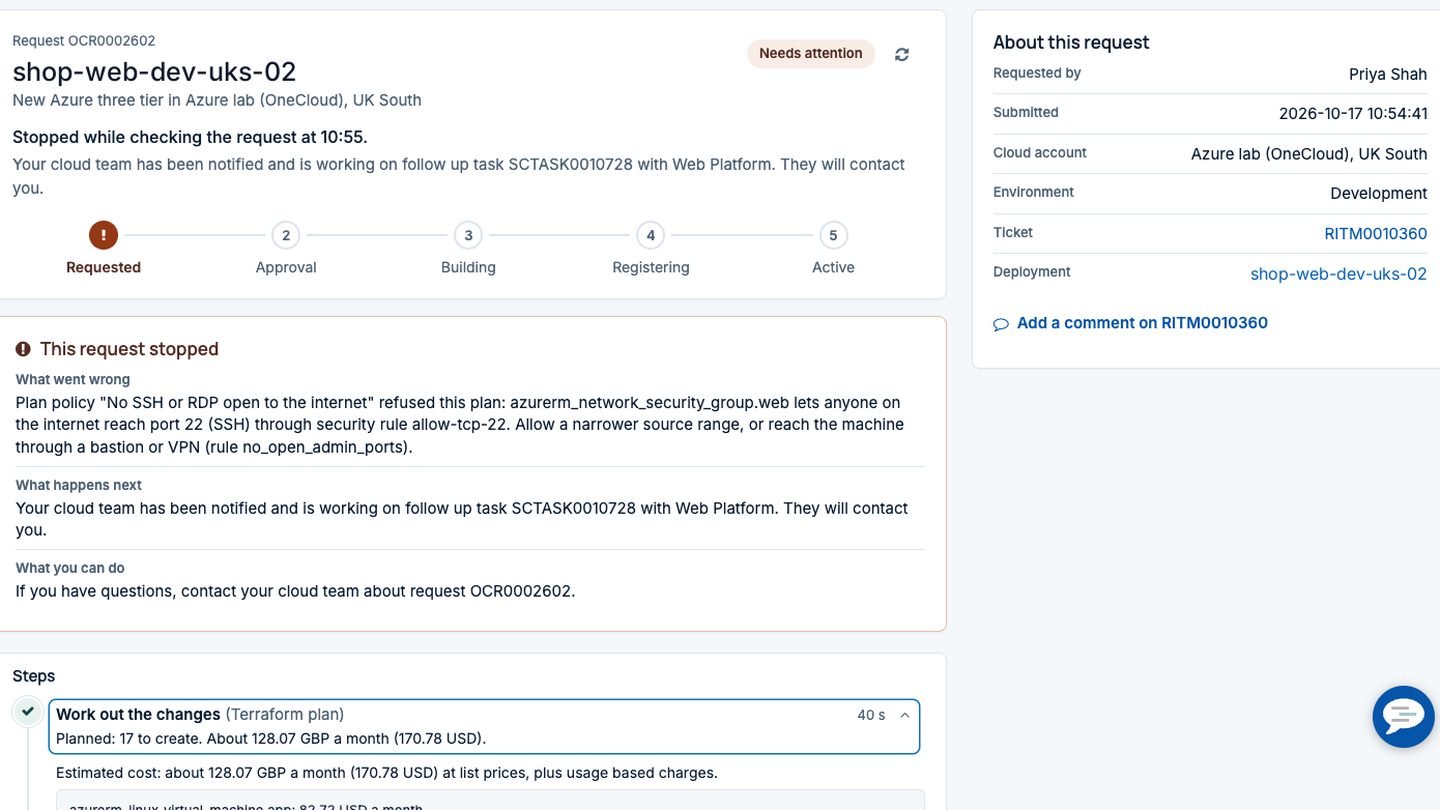
OneCloud ships with sample policies you can switch on as they are or adapt: no SSH or RDP open to the internet, required tags on every resource, and approved sizes in production. On an Azure three tier order that opened port 22 to anyone, the request stopped in about 40 seconds, before a single resource existed and before anyone’s approval queue filled up. The tracker named the security rule and suggested what to do instead.
The same check applies to day 2 work. Asking to open port 22 on a running deployment is refused the same way, while opening port 8080 goes on to approval with any warnings attached.
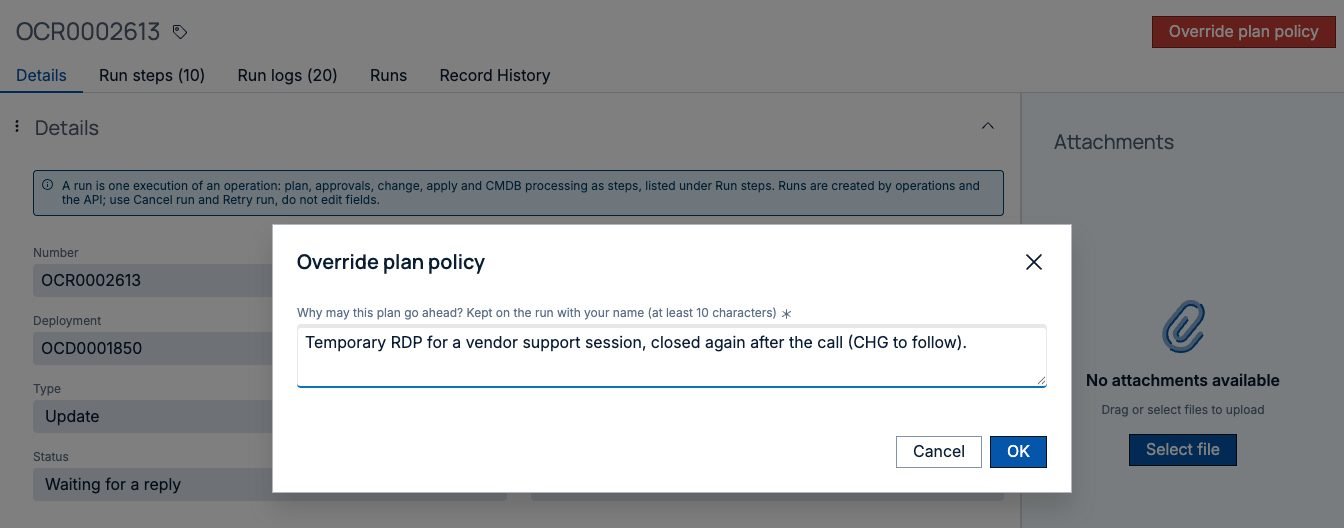
Real life has exceptions, such as a vendor who needs RDP for one support call. With an override, the exception is a named decision with a reason, not a rule someone quietly switched off.
Price limits work the same way. A rule can hold any order whose estimated monthly cost (or, for managed service providers, the customer’s price) is above a set figure, and send it for approval with the number in front of the approver. More on the estimate in know your cloud cost before you order.
Approvals where they earn their keep
Not every request needs a human. A development order that passes its plan policies can go straight from plan to build with no approval and no change request, while a production order or a removal waits for the right group.
That’s set by the process owner, per operation and per template: which runs need an approval, which need a change request, and which group decides. When a change is required OneCloud raises it in ServiceNow Change and waits while it moves through your normal states and approvals. Change managers see a normal change, raised for a specific run, with the plan behind it.
Separation of duties is built in. The person who submitted a run, and the person it’s for, can’t approve that run or its change request. Their approval rows are set to not required with a sentence saying why, so the request never even appears in their own approvals, and any attempt to approve it anyway is refused. Someone else in the group decides. If nobody else could, the run waits for an administrator to add an approver. It never goes ahead unapproved.
Day to day access follows ownership. Members of a deployment’s owner group can see it and act on it, so a team can restart its own servers without a ticket, and people outside the group don’t see it at all. Quotas cap what a team or account can hold, and leases give temporary environments an end date, with reminders before it arrives and an extension that goes through the same rules as everything else.
Drift, found every night
Approvals cover the front door. People still change things by hand in the cloud console.
OneCloud checks active deployments every night against the real cloud. Each one gets a plan only run, a few at a time, and the result lists exactly which resources and attributes no longer match what was ordered. Nothing is applied. The owner group gets an email the first time a deployment drifts, the platform team gets a summary of the whole sweep, and the resource carries a “Changed outside OneCloud” label on the deployment page.
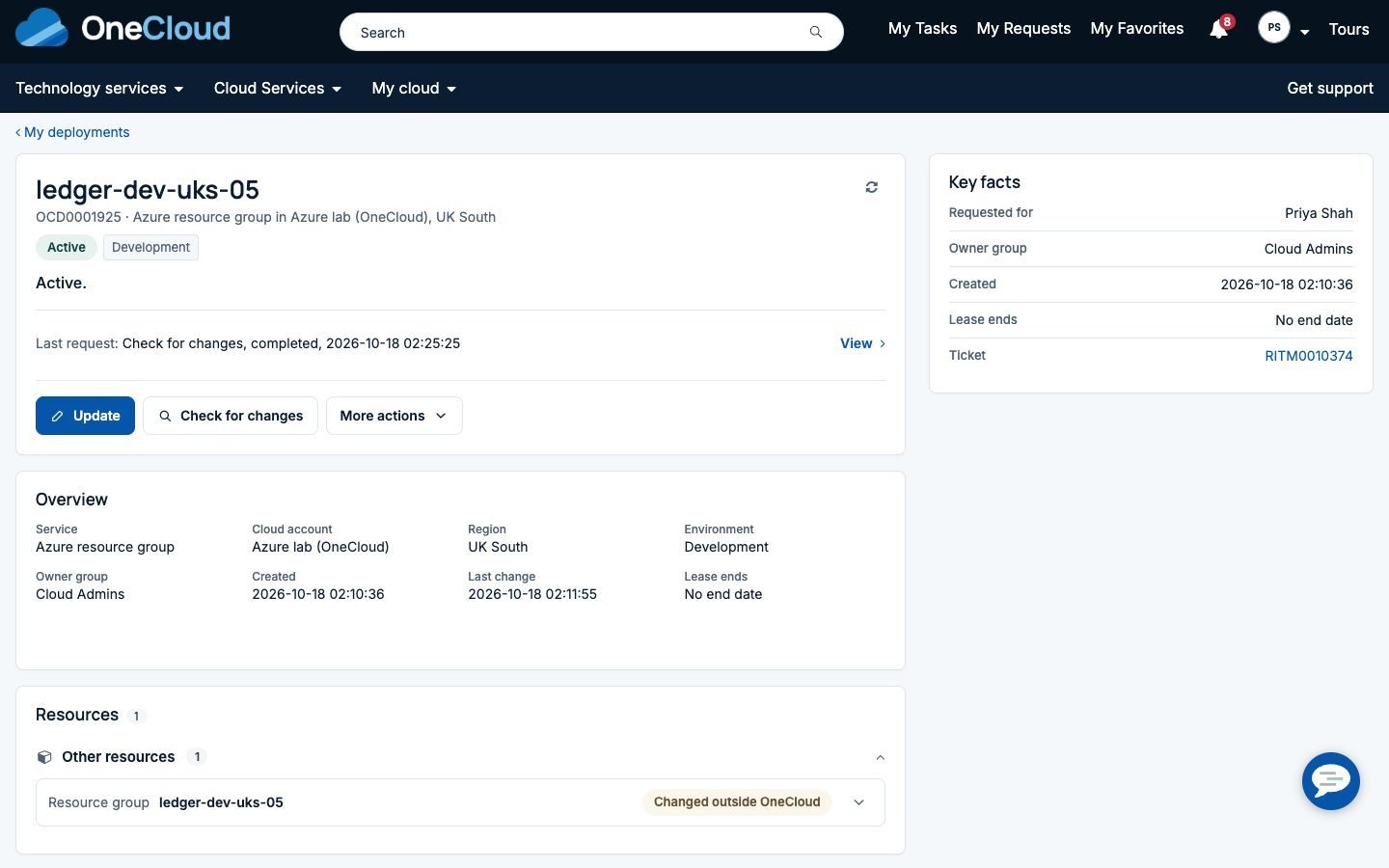
That’s the right default, in our view. Silently reverting someone’s change at 3am causes outages. Telling the owner, who can then put it back or update the deployment through the normal process, surprises nobody.
Tags get similar care: tag policies name the keys every deployment must carry, and the workspace lists the ones that fall short.
An audit trail you can hand to an auditor
Every deployment and every run has an audit trail page: who ordered it and with which inputs, which plan policies passed, warned or were overridden and by whom, who approved, which change request covered it and how it moved through its states, and what happened in the cloud. A filter narrows it to the people and decisions. Print it, or download it as CSV or JSON for your evidence store. Secret values never appear in it.
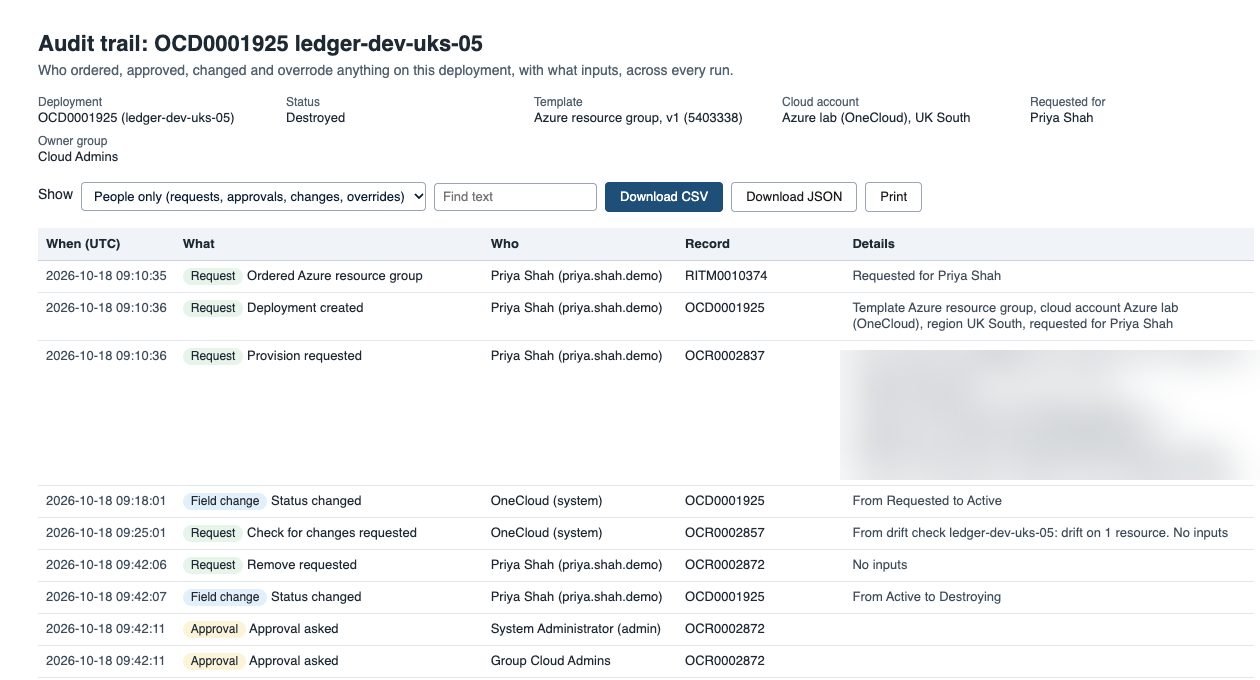
When a deployment is removed, the same rules apply: approval, a change request if your rules want one, Terraform destroy, and every configuration item retired in the CMDB. The record of what existed and who decided stays.
Credentials stay where they belong
Cloud credentials live in the platform’s credential store, or in HashiCorp Vault if that’s your standard, and are used only on the MID Server at run time. They never appear on command lines, in logs or in records on the instance, and the MID Server only connects outbound from your network.
Fast for the many, firm for the few
A compliant development order runs end to end in minutes. A risky one stops early with a reason a non-specialist can act on. Production goes through the approvals and change your organisation already trusts, and the audit trail writes itself.
If you want to see how this fits your own rules, the governance section of the OneCloud page has the detail, and the article on catalog items created for you shows where these checks sit in an order. Managed service providers can read how the same controls work per customer in OneCloud for MSPs.
We’re happy to walk through it with your own policies and approval rules. Book a demo or email us at info@intelibliss.com.
