



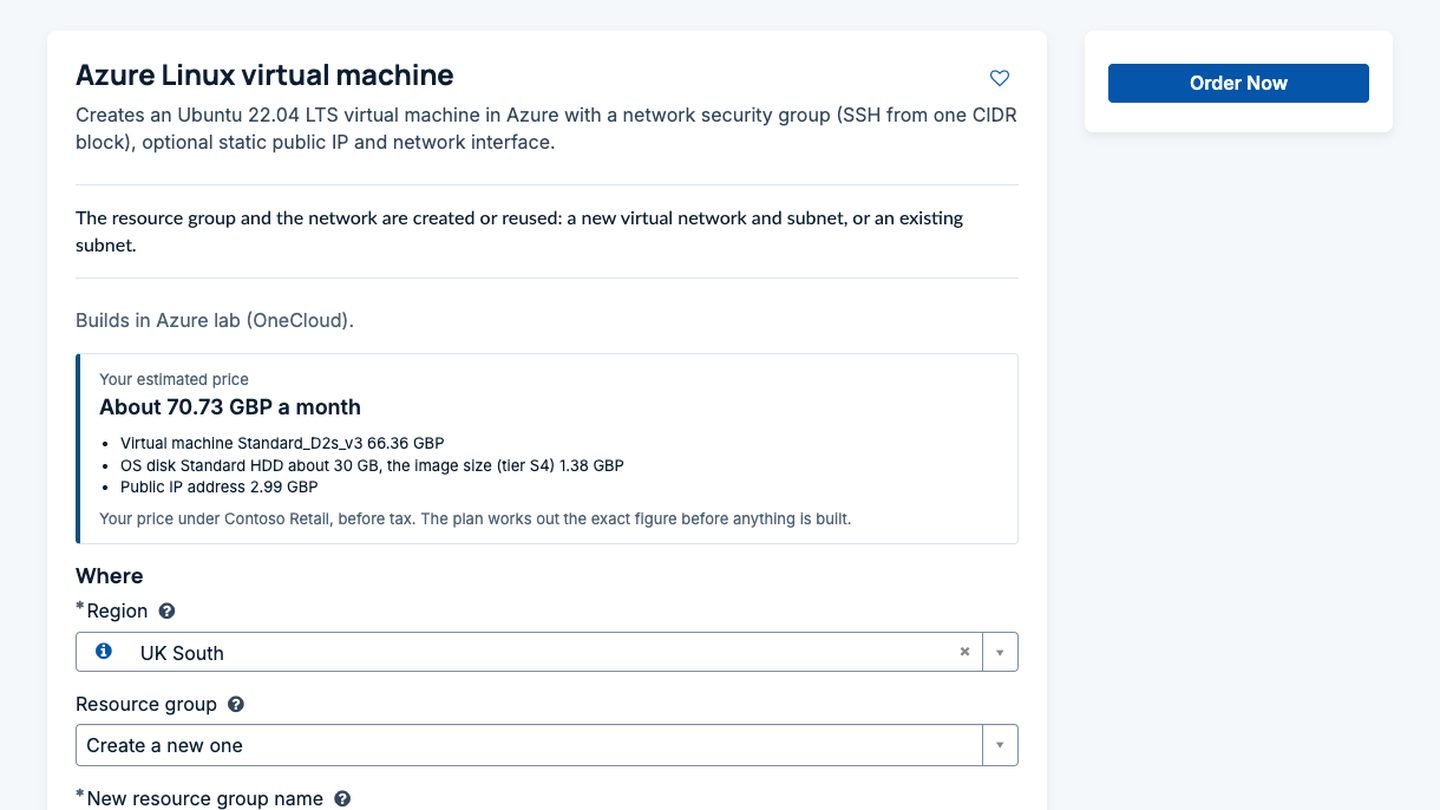
If you’re a managed service provider on ServiceNow, your customers already raise their tickets, changes and requests with you there. Cloud tends to be the odd one out. Orders arrive by email or through a separate portal, someone builds them by hand, and at the end of the month a spreadsheet turns the cloud bill into what each customer owes. It works until you have more than a handful of customers.
OneCloud puts that work on the instance you already run for them. Each customer gets one place to order, track and manage cloud across AWS, Azure, Google Cloud and Oracle Cloud, sees only their own deployments, gets a price before anything is built, and receives notices with their own branding. You keep one catalogue, one set of templates and one place to look after it all. This article walks through how that fits together for an MSP.
Many customers, one instance
In OneCloud a customer is a first-class record. Each one can have its own cloud accounts, its own Terraform connections with their own state, and its own people. A requester from one customer sees only that customer’s cloud accounts on the order form, and only their own deployments and resources afterwards. Ask for an action on another customer’s deployment, through the portal or the API, and the answer is that it doesn’t exist for you.
Two customers can order at the same minute, on the same cloud subscription if you like, and their runs go side by side through separate connections and separate state.
You don’t have to build the catalogue twice. Templates, operations, policies and approval rules can belong to a shared area that every customer sees, so a new Terraform template is offered to all of them at once. Where one customer needs something different, settings resolve per customer and per cloud account: a customer can have its own approval group, its own default tags or its own lease length without anyone touching the shared item. How a template becomes a catalog item in the first place is covered in catalog items, created for you.
With or without domain separation
Plenty of MSPs use ServiceNow domain separation to keep customers apart. OneCloud works on domain separated instances without any extra switch: its records carry the right domain, including those written in the background when a run finishes, so the platform shows each person only what their domain allows. If you don’t use domain separation, OneCloud’s own customer scoping does the job on any instance. You can use either, or both.
A price on every order
This is where most MSP cloud set-ups fall apart. OneCloud turns what the cloud charges into what each customer pays, using price plans you control.
A price plan starts from list cost or from what you actually pay, applies a default markup, then rules by cloud, service, region or SKU. Storage can carry a higher markup, networking can pass through at cost, a service you don’t charge for can be left out. Plans are versioned with effective dates, so a new rate card starts on the first of the month without rewriting history. On top of the plan sit billing accounts (a whole customer, a cost centre, a project), negotiated discounts, management fees per deployment or per server, and contracted prices that apply to one customer or one cloud account. Exchange rates come from the cloud’s own figures where it gives them and from the platform’s rates where it doesn’t.
The requester sees the result on the order form, as they pick a size. They see their price, before tax, under their billing account. They never see your list price, your cost or your margin.
The same price appears on the approval and on the request, so the approver knows what they’re agreeing to. You can also set price limits as policy. For example, any order for one customer above a monthly price can wait for that customer’s approvers, with the reason written in plain words: the estimated price, the limit, and who needs to decide. Approvals keep separation of duties, so nobody approves their own order. Our article on knowing the cost before you order covers the estimate itself, and governance without slowing people down covers policies and approvals in more depth.
Check a price before you rely on it
Pricing rules are easy to get subtly wrong, so OneCloud has a page called Try a price. Pick a billing account and a month, then either type a made-up cost line or choose one of the account’s real deployments. OneCloud shows the price step by step: the cost basis, the exchange rate, the rule that matched, the discount and the rounding. Nothing is saved or charged.
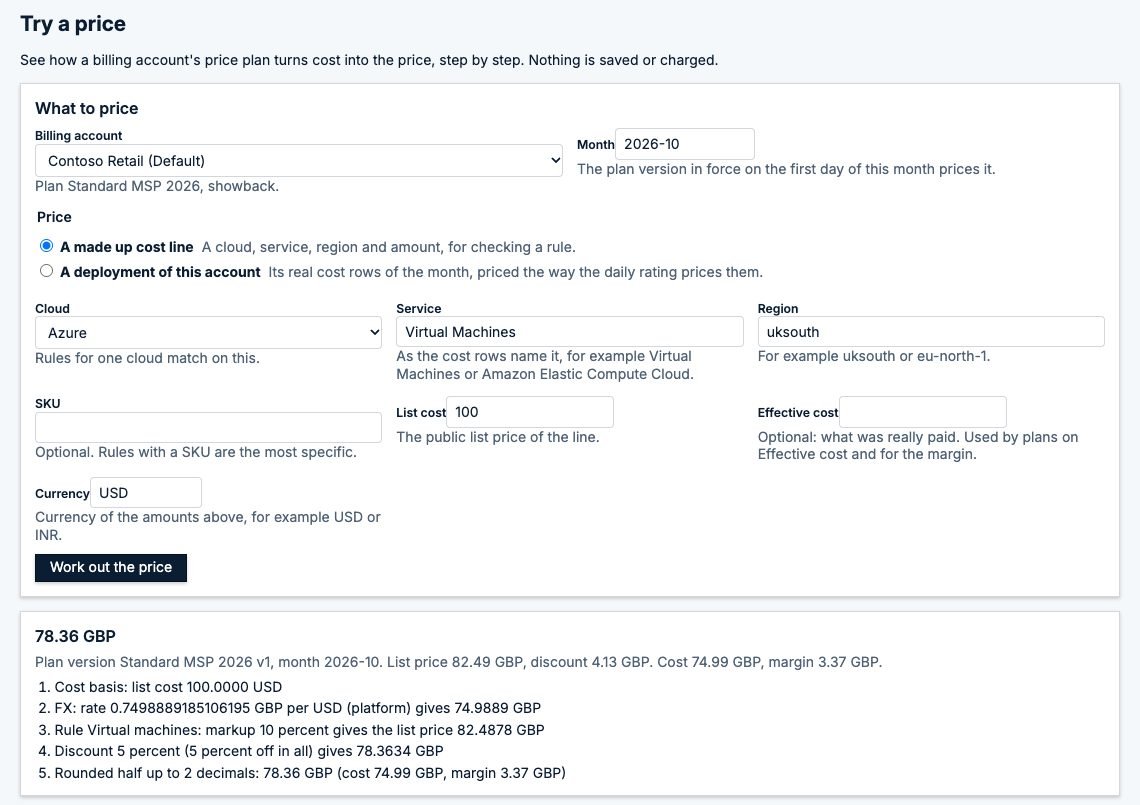
We’d use it whenever a plan changes. It answers the question a customer will eventually ask, “why is this line that number?”, before they ask it.
The month: rate, review, close, reconcile
OneCloud reads actual cost from the cloud providers’ cost APIs or exports every day and rates it against each billing account’s plan. Each billing account gets a statement for the month, one line per deployment, service, region and fee, and every line keeps the steps that priced it. Showback accounts get statements that keep updating through the month. Chargeback accounts are fixed once finance closes the period, and corrections go in as adjustments with their own approval.
Before you close, the reconciliation page puts the cloud bill next to what the rating priced, per customer. It flags any difference above your tolerance and lists deployments that had cost but no billing account, so nothing slips through unbilled.
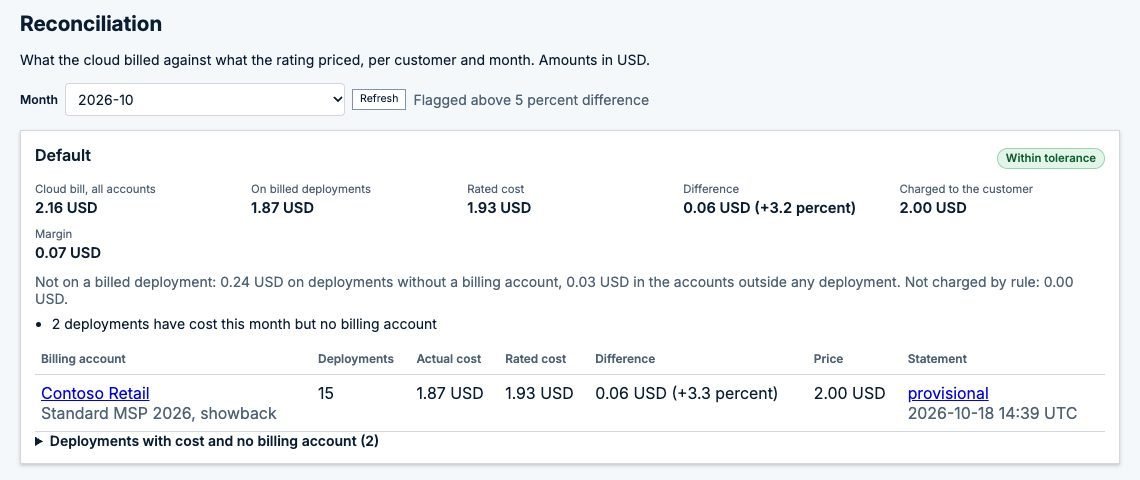
When the month is right, export the lines as CSV for your invoicing or ERP system. That’s a deliberate line we drew. Your invoicing system already numbers invoices, works out tax and takes payment, and it should stay in charge of that. OneCloud gives it clean, explained lines to work from.
Your customers’ brand on every notice
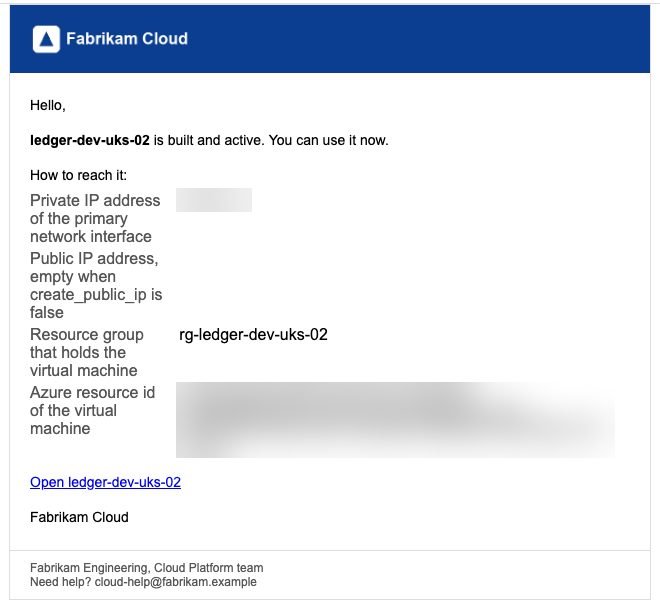
Customers notice the details. OneCloud’s emails go out through the platform’s notification engine, so preferences, delegates and the email log all work as usual, and each customer can have its own branding: product name, logo, colours, sign-off, footer and support contact. Request received, approved, built and active, change done and removed all carry the same frame.
Chat works the same way. Each customer can have its own Microsoft Teams or Slack channel, or a webhook, for the events they care about. One customer’s channel never gets another customer’s events, and the webhook addresses stay in the platform’s credential store.
And if you’re not an MSP
Most OneCloud customers are single companies, and none of this gets in their way. With one customer, OneCloud shows nothing about customers at all. Pricing and billing stay out of sight until you switch them on, and plenty of central IT teams do exactly that to show business units what they use. See OneCloud for MSPs on the product page for the summary.
Talk to us
If you run ServiceNow for several customers and cloud is still handled on the side, we’d like to show you OneCloud with your own templates and a price plan that looks like yours. Get in touch or email info@intelibliss.com.
