



Running IT operations means dealing with hundreds, sometimes thousands, of alerts a day. Most arrive as raw technical payloads that take time to read, let alone act on. Otto for ITOM, which shipped as Otto for ITOM and still carries that name in the plugin, adds generative AI to Event Management so that an operator can understand an alert, find a likely cause and decide what to do in far less time.
What Otto for ITOM does
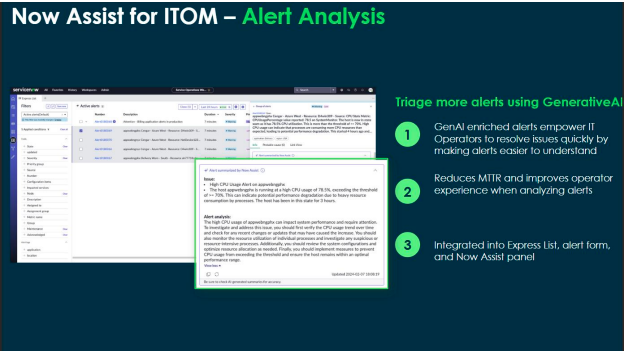
Otto for ITOM sits inside the Event Management module and works on the alert triage process. It reads incoming alerts, looks at the surrounding system context and past incidents, and produces plain language output that an operator can act on. The results appear in the Express List, on the alert form and in the Otto panel of Service Operations Workspace.
There are two skills in the current release.
Alert analysis
Traditional alerts carry technical data that’s hard to read quickly. Alert Analysis turns that raw data into a readable summary. Behind the scenes it analyses the incoming alert, pulls in past incidents and system context, and writes a short explanation of what the alert means.
The output reads something like this:
“This alert is similar to previous incidents caused by the syncData batch job. Consider checking the schedule or memory usage during that time.”
Instead of guessing, the operator starts from a summary that already points in the right direction.
Alert investigation
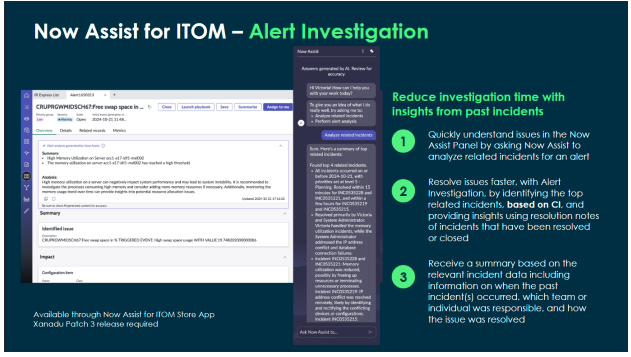
Once you understand what an alert says, the next question is why it’s happening and what to do about it. Alert Investigation handles that step. It looks for the root cause, suggests likely triggers based on system behaviour and alert history, and recommends checks or next steps. It also finds related incidents on the same CI and uses their resolution notes to explain when a similar problem last occurred, which team handled it and how it was fixed.
What you need in place
Three pieces of the platform need to be set up:
- Event Management, which collects and processes alerts from your monitoring tools.
- Service Operations Workspace, where alerts are displayed and worked.
- The Now Assist and generative AI plugins, which provide the AI features (the plugin names have not changed with the Otto rename).
The plugins involved are:
- Event Management (com.snc.event_mgmt), the core plugin for managing alerts.
- Machine Learning (com.snc.ml), required for the AI capabilities.
- Now Assist for ITOM (com.sn_itom.now_assist), as the Store app is still named, is the plugin that brings generative AI into ITOM. It’s delivered as a Store app and requires Xanadu Patch 3 or later.
The roles you’ll need are:
- event_management_user for basic access to Event Management.
- event_management_admin to configure alert rules and services.
- ml_admin if you need to work with the machine learning models.
- now_assist_user for access to the Otto features in ITOM.
How it works day to day
The flow is simple once everything is installed:
- An alert is created, say CPU usage is very high on a server.
- Otto reviews the alert, looks at current system data and checks similar past incidents.
- It writes a summary, for example: “CPU usage on Server A is high. This usually happens when the daily backup runs at 10 PM.”
- You act on the suggestion, or confirm the recommendation and move on.
The whole thing takes seconds rather than the minutes or hours of manual checking it replaces.
A realistic example
It’s Monday morning and the console shows 100 alerts. One says a database server has high memory usage. Without Otto, you’d check logs, look at the CPU graphs, search for past tickets and investigate by hand. Thirty minutes is a fair estimate for one alert.
With Otto, the alert already carries this:
“High memory usage detected on DB Server. Similar alert happened last week due to nightly data sync job. No impact recorded previously.”
You know straight away it’s a known, non-critical condition and can move to something more urgent.
Where it pays off
- Faster resolution, because answers arrive in seconds rather than after a manual investigation.
- Fewer mistakes, since a clear summary removes guesswork.
- Less alert noise, as the important alerts stand out from the rest.
- Easier collaboration. A human readable alert is simple to hand over to another team.
- Better decisions, with likely causes and possible fixes suggested up front.
If your operations team spends a large share of its day on repetitive alert checks, Otto for ITOM is worth evaluating. It doesn’t replace good event rules and a tidy CMDB, both of which it relies on, but it does take a lot of the reading out of triage.
