



ServiceNow ships two releases a year, and most of the AI capability arrives in them. A platform that takes a quarter to upgrade is always a release behind, which in 2026 means always a step behind on Otto, AI Agents and Control Tower. This is the process we run for managed services customers to land a release in four to six weeks, repeatably.
Why upgrades hurt
Three reasons, in order of frequency. Customisations in global scope that override platform behaviour and break when the platform changes underneath them. No automated tests, so every upgrade is a manual regression cycle that nobody has time for. And integrations with no owner, discovered to be broken by the people on the other end.
None of these are fixed during an upgrade. They are fixed between upgrades, which is why the process below starts before the release does.
Between releases: reduce what you have to test
- Retire customisations. Each release, pick the five customisations with the highest skipped-update count from the last upgrade and replace them with platform features or scoped equivalents. The skipped list gets shorter every time.
- Build ATF coverage for the flows that matter. Not everything. The twenty or thirty user journeys that would stop the business if they broke: raise an incident, approve a change, fulfil the top catalog items, the HR case flows, the integrations that feed the CMDB. Run them weekly, not just at upgrade time.
- Name an owner for every integration. A spreadsheet is fine. The point is that when the upgrade breaks something, you know who to call before the other side calls you.
The six-week upgrade
- Week 1: read and plan. Release notes against your installed applications, deprecations, and the skipped-update list from last time. Decide the target patch, not just the family. Book the test window.
- Week 2: upgrade sub-production. Dev first, then test. Review every skipped update with the person who made the original change, or with its owner if they have gone.
- Weeks 3 to 4: test. ATF runs first and tells you where to look. Manual testing covers what ATF cannot, mostly UI and integrations. Fix forward in dev, promote to test, re-run.
- Week 5: user acceptance and comms. Key users on the test instance for a week, a short note to the business about what changes for them, and a go or no-go with evidence.
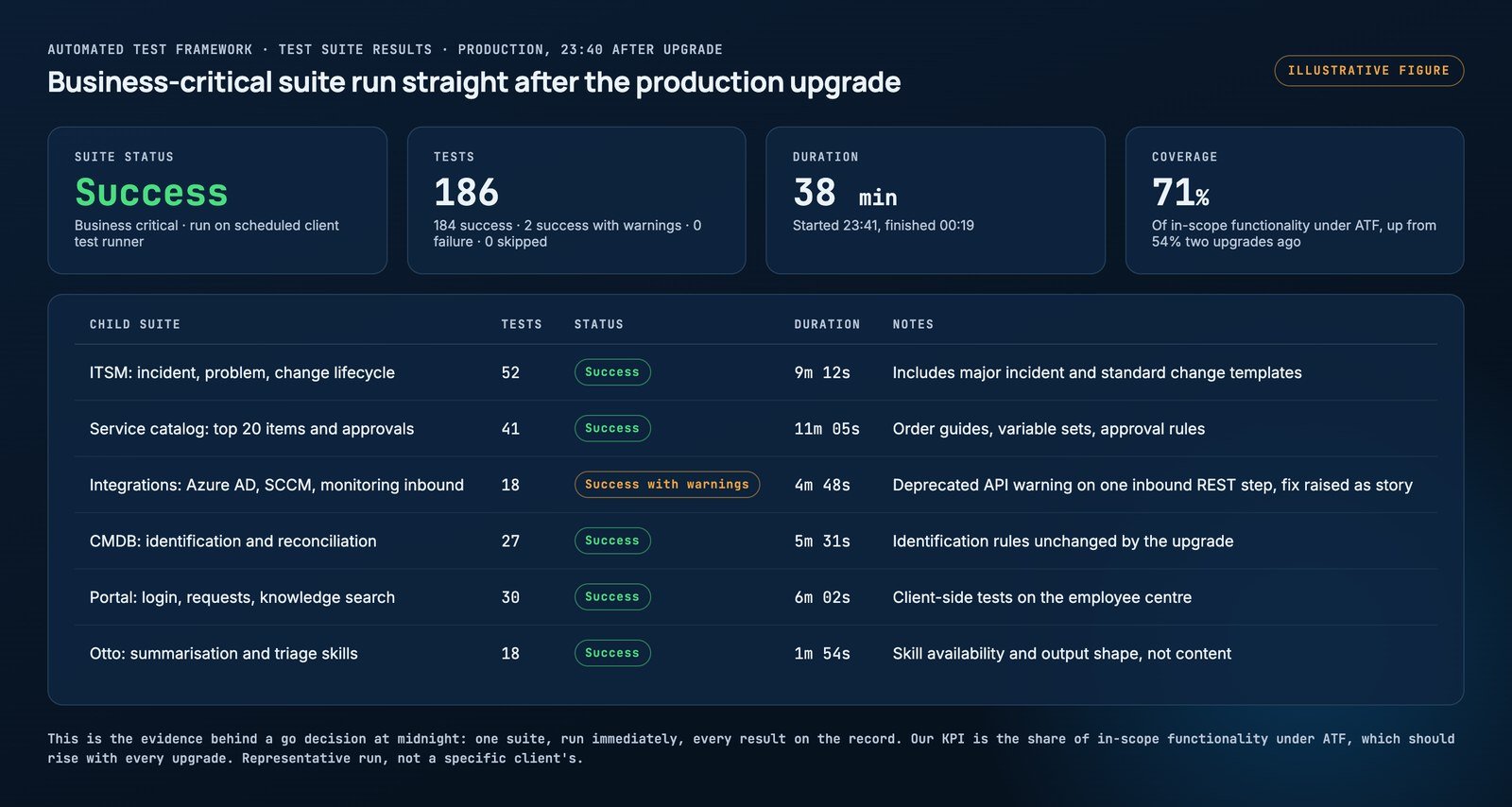
- Week 6: production. Upgrade in a maintenance window, run ATF immediately, keep the hypercare rota for five working days.
The go decision at midnight rests on one screen: the business-critical suite, run immediately after the upgrade, with every child suite on the record.
Australia and Brazil
Australia reached general availability in May 2026 and Brazil is in release preview as we write this. If you are still on Zurich or earlier, we would go to Australia now rather than wait for Brazil, because the AI capabilities and Control Tower changes are worth having and the jump from two releases back is harder than two single steps.
If you are on Australia, start the Brazil process when early access opens, using a sub-production instance. By the time it is generally available you will have most of the testing done.
What this costs
For a mid-sized platform with reasonable hygiene, the six-week process is roughly fifteen to twenty-five consultant days, most of it testing. For a platform with heavy customisation and no ATF, the first upgrade is more and the second is less, because the between-release work pays back immediately.
Our managed services packages include both upgrades a year and the between-release work that makes them cheap. That is usually the point at which customers stop dreading release day.
