



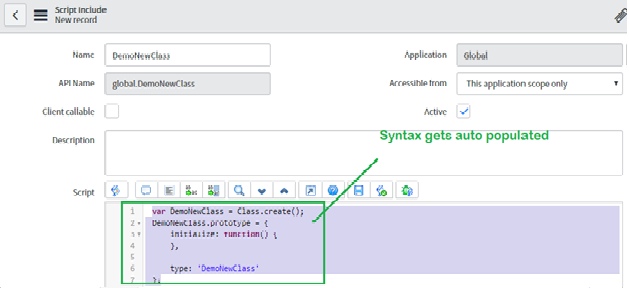
A script include is a server-side JavaScript object that holds logic you want to reuse. Instead of copying the same GlideRecord query into five business rules, you write it once in a script include and call it from each of them. It’s the main way to keep server-side code on ServiceNow modular, and it’s where most of your business logic should end up.
What they are
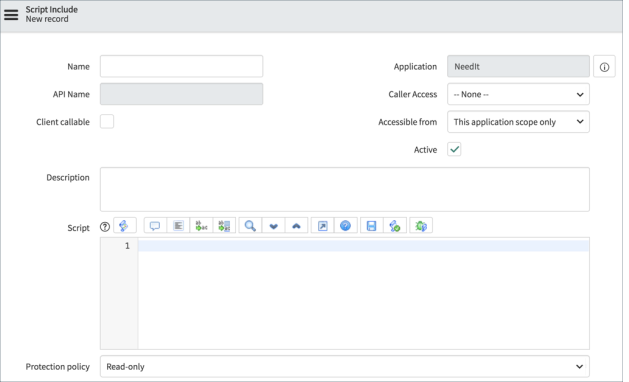
Script includes live under System Definition > Script Includes. Each one defines a class (or, less commonly, a plain function) that other server-side scripts can instantiate: business rules, scheduled jobs, script actions, flow actions, UI actions, other script includes. With the Client callable option ticked they can also be reached from the browser through GlideAjax.
When you give a new script include a name, the platform populates the class skeleton for you:
var DemoNewClass = Class.create();
DemoNewClass.prototype = {
    initialize: function() {
    },

    type: 'DemoNewClass'
};
You add methods to the prototype and call them after instantiating the class:
var demo = new DemoNewClass();
demo.someMethod();
Script includes can also extend one another. The syntax is Object.extendsObject, and the parent’s methods are available on the child:
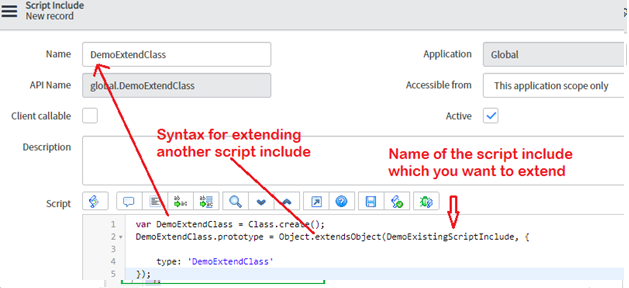
var DemoExtendClass = Class.create();
DemoExtendClass.prototype = Object.extendsObject(DemoExistingScriptInclude, {

    type: 'DemoExtendClass'
});
This is how you’d add application-specific behaviour on top of a generic utility class without touching the original.
Why they matter
- Modularity. Related logic sits together in one object with a clear name, instead of being scattered across triggers.
- Reuse. One implementation, called from many places. Fix a bug once.
- A single source of truth. When the rule for calculating an SLA target or validating a cost centre lives in one script include, there’s no argument about which copy is right.
- Testability. A method on a script include can be exercised in isolation from a background script or an ATF server-side test, which is much harder with logic buried in a business rule.
- Performance. Centralising common queries makes it easier to spot and remove redundant database calls.
How to use them well
Create the script include under System Definition > Script Includes with a clear name and description. Pay attention to the Accessible from setting: “This application scope only” is the safe default, and you only widen it when another scope genuinely needs the class.
Define methods for the logic you want to share. Keep each method focused on one job and keep the public surface small.
Call it from other server-side scripts:
var utils = new MyUtils();
var name = utils.getFullName(current.getValue('assigned_to'));
Test it. ATF supports server-side test steps, and a quick background script is fine for checking behaviour while you’re developing. Either way, write the test against the script include, not against the business rule that calls it.
Track changes. Script includes are versioned like any other platform artifact, so you can review history and revert. Keep them in update sets or application repositories and, if your team uses source control, commit the application to Git.
Habits that pay off
- Keep methods small and name them for what they return or do.
- Use descriptive names for the class itself. “IncidentAssignmentUtils” tells the next developer what’s inside, “Utils2” does not.
- Document the purpose, parameters and return values at the top of each method. A short comment saves a lot of reading later.
- Handle errors deliberately. Wrap risky calls in try/catch, log with gs.error() including enough context to find the record, and return something the caller can check.
- Watch performance. Avoid unbounded GlideRecord queries, add setLimit where one record is enough, and don’t do heavy computation in a method that’s called from an onChange client script.
A few patterns worth knowing
Encapsulate business rules. A script include that handles currency conversion or tax calculation can be reused across every module that needs it, so the arithmetic is consistent everywhere.
Extend rather than copy. If you have a generic utility class, extend it in a child class for application-specific additions. The base stays clean and the extension is easy to find.
Use them from everywhere. Business rules, flow actions, scheduled jobs and UI actions can all call the same script include, which is the point. A validation rule enforced in a business rule and a flow should be the same code.
Script includes aren’t complicated. The discipline is in actually putting logic there rather than in the nearest business rule, and in keeping them tidy once they exist. Do that and a ServiceNow instance stays maintainable long after the original developers have moved on.
